GST Tax Authority setup

GST Tax Authority setup

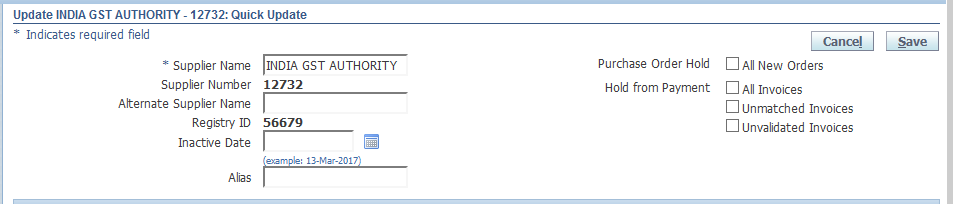
We need define a GST Tax authority in the system so to settle the tax liability. This is a base apps setup and we should define this setup before doing the GST transactions/ start setup as it will be required right at for setup of 1st party (own company).
Basically there should be only one GST tax authority pan India, this authority will have multiple regional office as well pertaining to specific type of GST tax like IGST+CGST with central Govt and SGST with State Gov.
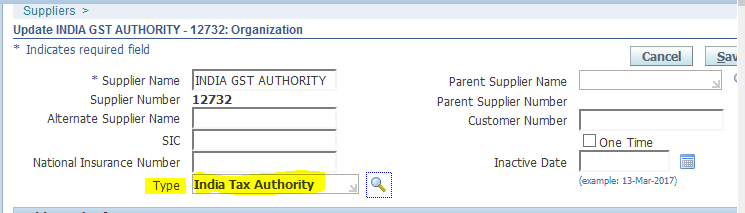
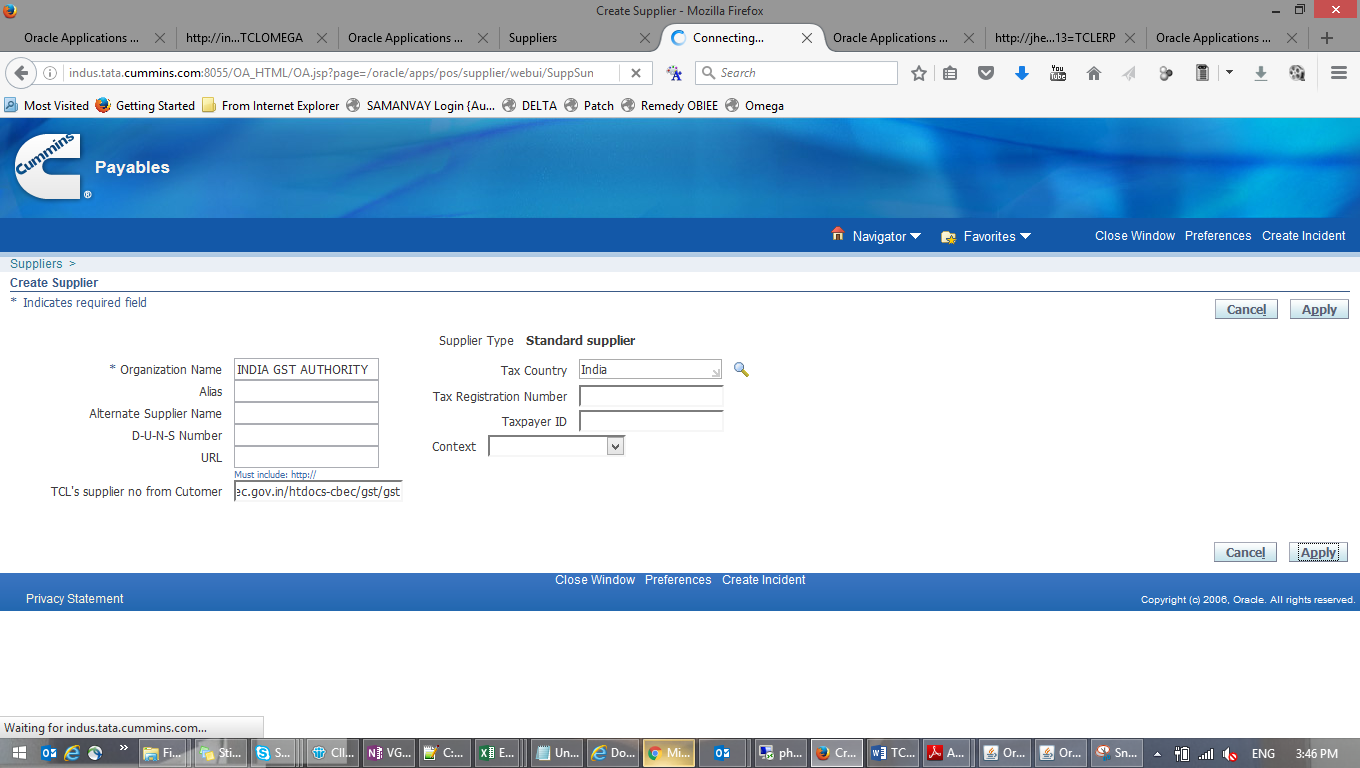
Define a new supplier “INDIA GST AUTHORITY” with its Organization type = India Tax Authority
Make sure the type of supplier is ‘India Tax Authority
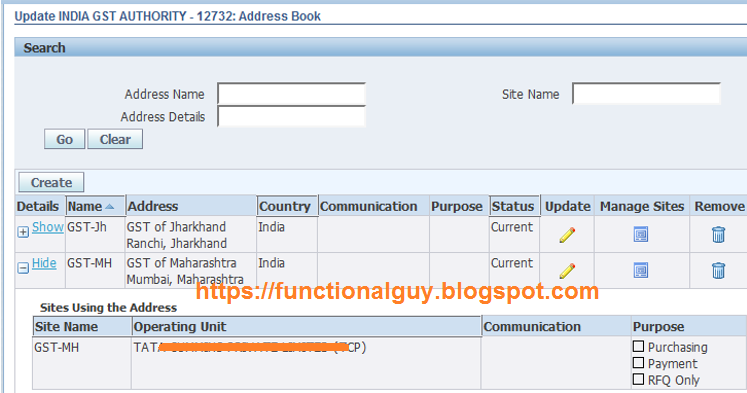
As discussed above authority will have reginal office as well, so define corresponding address as site of the supplier in respective operating unit.
Multiple sites will be required for this supplier based on the states in which company have operations in.
We have defined two sites, one for Jharkhand and another for Maharashtra.
GST Regime

We can configure any new tax regime introduced by the statute by using the Regime definition form. For example, in the current context of GST tax, user can define a new tax regime called India GST and configure the system so to handle the transactions that have the GST applicability.
(N) Oracle Financials for India >> Tax Configuration >> Define Regime
Regime type = Transaction Tax
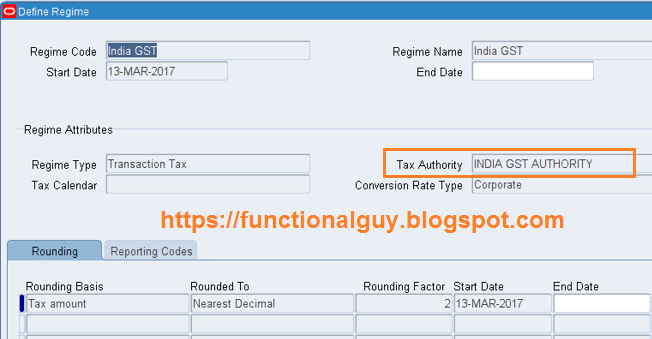
Define Reporting code with Entity – Regime (this is optional step)
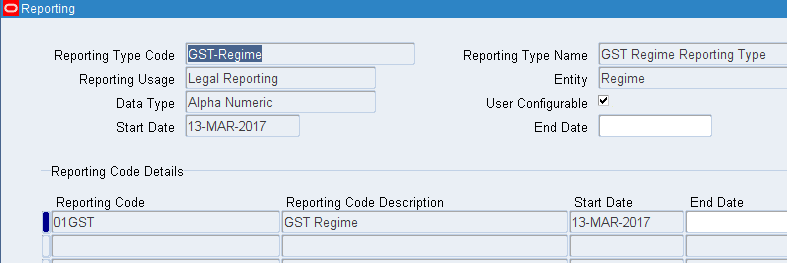
Assigned this Reporting code at Regime level.

Comments

Popular posts from this blog

Oracle Subledger Accounting (SLA) Tables, Views

Oracle Subledger Accounting (SLA) Tables, Views Oracle Subledger Accounting Tables: TABLE NAME DESCRIPTION XLA_AAD_GROUPS The XLA_AAD_GROUPS table stores the merge dependencies analyzed during the merge analysis.  All application accounting definitions with the same GROUP_NUM must be merged together. XLA_AAD_HDR_ACCT_ATTRS The XLA_AAD_HDR_ACCT_ATTRS stores standard, system and custom sources assigned to an accounting attribute at the AAD level. XLA_AAD_HEADER_AC_ASSGNS Store the analytical criteria for the application accounting definitions. XLA_AAD_LINE_DEFN_ASSGNS This table stores the journal lines definitions for the application accounting definitions. XLA_AAD_LOADER_DEFNS_T The XLA_AAD_LOADER_DEFNS_T table is the interface table that facilitates the data transfer from data files and the database. XLA_AAD_LOADER_LOGS The XLA_AAD_LOADER_LOGS table stores the errors and logs generated by the application accounting definitions loader. XLA_AAD_SOURCES XLA_AAD_SOURCES table stores a...

O2C Cycle with Accounting Entries

  ORDER    TO  CASH  PARTICULARS  DR  CR SPL NOTES ACCOUNT IS PULLED FROM Sales order entry No Accounting Sales Order Pick From Sub Inventory A/c 100 At Standard Cost Sub-inventory Material A/c Setup To Sub Inventory A/c 100 At Standard Cost(Staging) Sub-inventory Material A/c Setup Sales Order Issue COGS 100 It can be fetched from five places Master Item/Org/Order Type/Line Type/Shipping Params To Sub Inventory A/c 100 At Standard Cost Sub-inventory Material A/c Setup Transaction level Receivable A/c 120 Auto Accounting Tax A/c 10 Auto Accounting Freight A/c 10 Auto Accounting Revenue A/c 100 Auto Accounting Receipts Receipts with no remittance method Cash 100 Before application of the receipt Receipt class Unapplied A/c 100 Receipt class Unapplied A/c 100 After application of the receipt to the transaction Receipt class Receivables A/c 100 Receipt class Cash A/c 100 Receipt class Unidentified A/c 100 In case of receipt without customer...

R12 Oracle E-Business Tax Configuration Guide

Applies to: Oracle E-Business Tax - Version: 12.0 to 12.2 Information in this document applies to any platform. Abstract R12 Oracle E-Business Tax Configuration Guide Document History R12 Oracle E-Business Tax Configuration 1. Tax Basic Tax Configuration Tax Definition: comprises the tax data that you set up for each tax regime and tax that your company or institution is subject to. The Tax Authority designates the regulations and rates that apply to the tax regime. Required Task List a) External Dependencies Create First Party: Legal Entity and Establishments Create Reporting and Collecting Tax Authorities b) Tax Configuration Create Tax Authorities Party Tax Profiles Create Tax Regimes Create First Party Legal Entity Party Tax Profile Create Tax Create Tax Status Create Tax Jurisdictions Tax Rate Responsibility: Tax Manager Path: Tax Managers -> Tax Managers -> Home Complete the following setup tasks: -Legal Entities and Establishments -Reporting and Collecting Tax Authorities ...